Hello and welcome,
Pythia's Deckbox has just released the new Referrals feature and launched our first Referral Campaign! You're now able to invite your friends, or other Gods Unchained players, to join you on Pythia's Deckbox and enjoy the ever-growing offerings. If they take you up on it and end up renting cards themselves, you'll earn credit based on their spend. You can then use this credit to reduce the platform fees you pay when you rent cards yourself, or as a payout boost when one of your listings is rented.
Let's dive in!
Attribution
Your referral code is how you get credit for someone you've referred. Every account is automatically assigned a code the first time you visit the Referrals dashboard, no setup required. Make sure anyone you'd like to bring on board signs up after using your link.
A few important details about how attribution works:
- The window is 14 days. If a visitor lands on Pythia's Deckbox via your referral link and signs up within 14 days on the same browser, they'll be attributed to you.
- Last-touch wins. If they click multiple referral links in that window, the most recent one is the one that sticks.
- No special signup flow. No extra steps, attribution happens automatically in the background
You can find your referral code on the Referrals dashboard, reachable via the new banner on your Profile page.
Open the Referrals dashboard →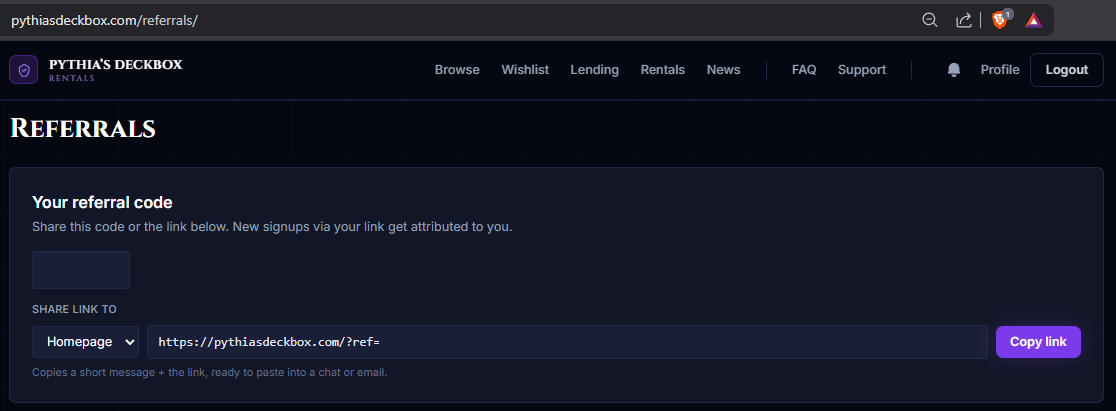
Reward structure — Campaign 1
Rewards are distributed based on milestones, and both rewards and milestones are configured per campaign. Campaign 1 launches with six milestones of varying value, designed to avoid common pitfalls in the Web3 referral space (sign-up bonuses with no follow-through, single-rental gimmicks, and so on).
The first milestone is the simplest: getting a new user signed up so they can begin their journey on the platform. This puts them on your dashboard and lets you watch their progress toward the milestones that actually issue credits.
After that, every credit-earning milestone is calculated as a percentage of the system fee their rentals generated in that slice. The juicier the rentals, the more you earn.
| Milestone | Reward | Condition | Credit expiry |
|---|---|---|---|
| Sign-up | None, referee on your dashboard | Referee signs up via your link | — |
| 1st rental | 30% of system fee | Referee completes their 1st rental | 14 days |
| 3rd rental | 35% of system fee on rentals 2–3 | Referee completes their 3rd rental | 14 days |
| 5th rental | 40% of system fee on rentals 4–5 | Referee completes their 5th rental | 28 days |
| 10th rental | 50% of system fee on rentals 6–10 | Referee completes their 10th rental | 28 days |
| Refresh (every +10) | 50% of system fee on the latest 10 | Every 10 additional completed rentals (20, 30, 40, …) | 28 days |
Credits don't reset on a milestone. Each milestone adds a fresh grant on top of any unspent credit you already have, with its own expiry clock. As your referees keep hitting later milestones, you'll always have a runway of fresh credit on the way until their lifetime max.
When you (or one of your listings) draws on credit, the system always consumes the grant closest to expiring first, so nothing sits unused.

To balance both renters and lenders being able to apply credits, the maximum credit that can be applied to any single rental is capped at 50% of the platform fee, and that 50% is independent for each side. So renter and lender can each apply up to 50% of the system fee, for a combined maximum of 100%.
Referrals Dashboard
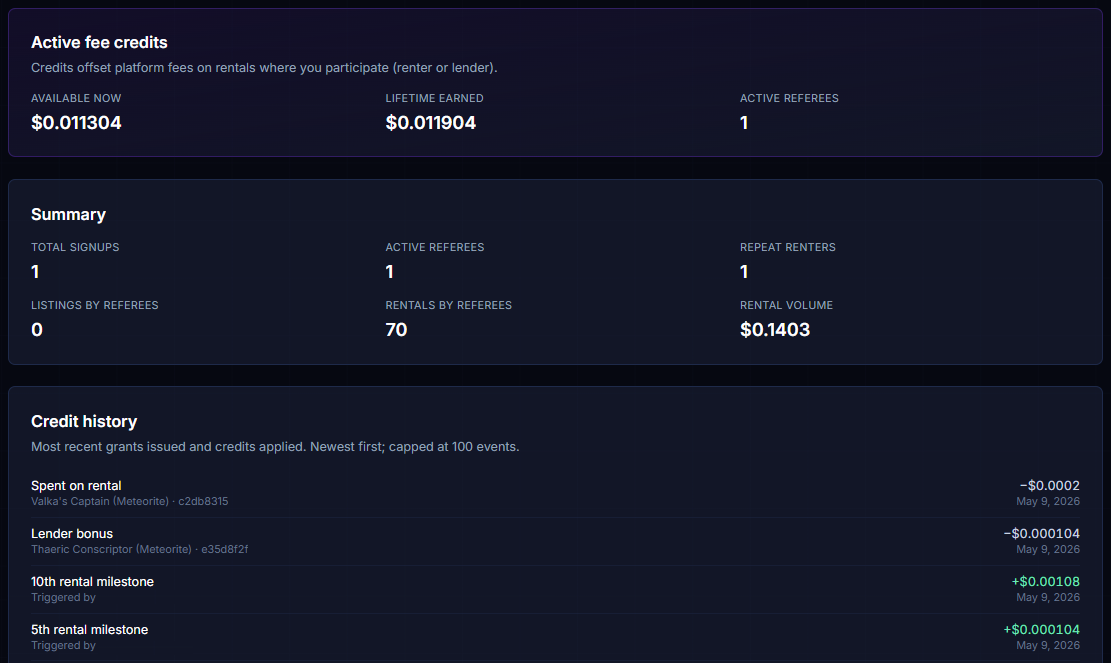
The Referrals dashboard is your control center for everything referral-related. From here you can:
- Grab and share your referral code
- See a summary of your referees' activity since they joined
- Track your active fee credit balance and lifetime credits earned
- Review the full credit history: every grant issued and every credit applied
- Inspect each referee's progress toward their next milestone, and see when your earliest credit expires
Benefits — Renters
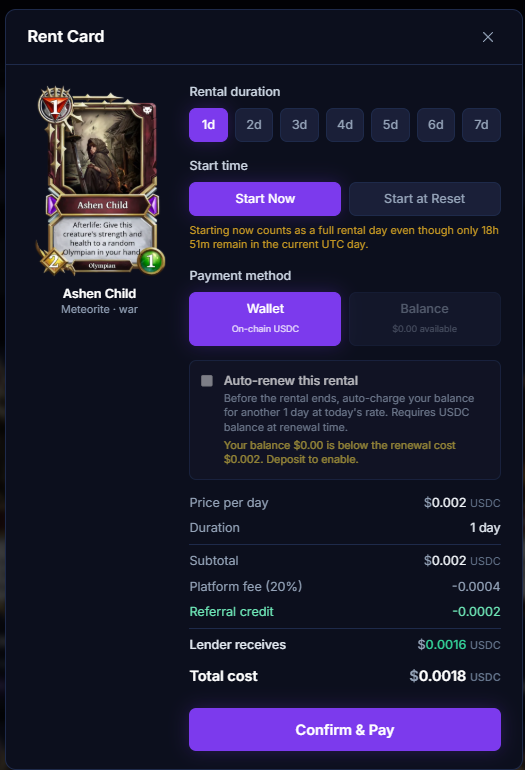
Renters can use their fee credits to reduce the system fees they pay on any rental, up to 50% of the system fee on that rental. This works automatically for every rental type, single cards, batch rentals, full deck rentals, and even auto-renewals.
When you open a rent modal, the credit that will apply is shown right in the cost breakdown so you know what you're getting before you confirm.
Benefits — Lenders
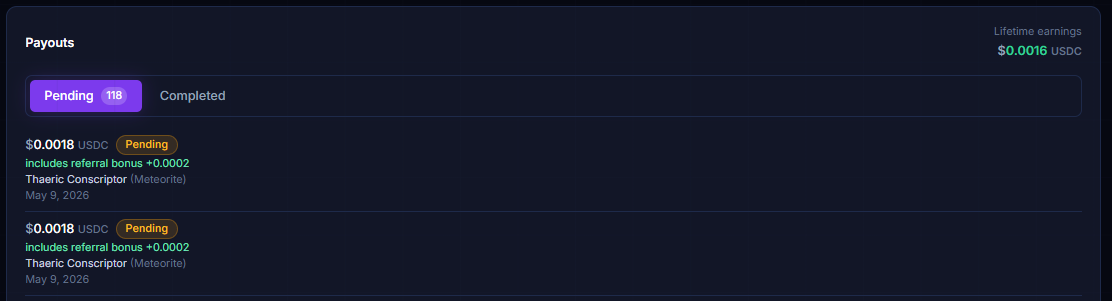
When one of your listings is rented and you have available credit, the system automatically applies your credit as a payout boost, up to 50% of the system fee on that rental, paid to you on top of your normal listed payout. You don't have to enable anything; it's automatic on every payout.
The Payouts panel on your Profile shows the bonus inline, so it's clear which payouts were boosted and by how much.
Wrapping up
That covers everything you need to know about our new Referral Campaign and what to expect! I'm looking forward to hearing feedback and ideas for future campaigns and continuing to grow the platform together.
A few links to get you started:
Open your Referrals dashboard → Visit your Profile →Need help?
If you still have questions or run into any issues please join our official Discord to report the issue and receive assistance — we do not provide support elsewhere.
Join the Discord →Happy renting!
- Apocalypse